Microsoft Coreutils for Windows: Unix commands without WSL
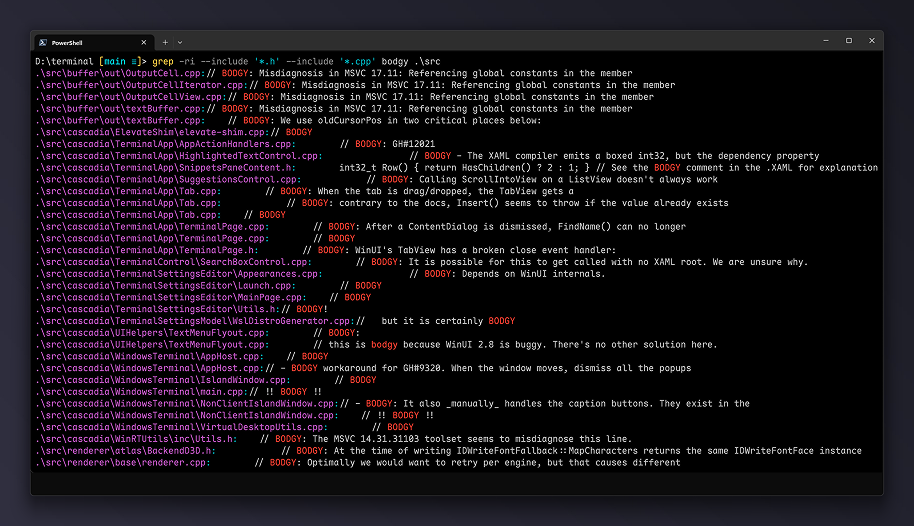
Microsoft has released Coreutils for Windows, a preview package that brings familiar Unix-style command-line tools to native Windows. After installation, commands such as cat, grep, find, xargs, ls, cp, mv, and rm are available directly from Windows shells. The package is installed through WinGet:
winget install Microsoft.CoreutilsThis is not just another convenience package for people who dislike PowerShell syntax. It is a practical acknowledgement that modern development workflows move constantly between Linux, macOS, WSL, containers, CI systems, cloud shells, and Windows laptops. The common language across those environments is usually not a Windows-specific command set; it is the small Unix toolbox that appears in README files, shell snippets, build scripts, and agent-generated terminal commands.
The package is a Microsoft build, not a POSIX emulator
Coreutils for Windows is a Microsoft-maintained build of uutils/coreutils, the Rust rewrite of GNU coreutils. Microsoft’s package also bundles findutils and a GNU-compatible grep, then exposes the tools as standard executable names such as cat.exe, grep.exe, and find.exe. The repository describes the package as a single multi-call binary for Windows, which keeps the installation compact while still presenting the usual command names.
The current release is explicitly marked as preview. That distinction matters: Windows is not becoming a POSIX system, and the package is not a replacement for WSL, MSYS2, Git Bash, or Cygwin. It is a native utility layer for everyday file, text, and pipeline operations.
Why this matters even when PowerShell already exists
PowerShell is powerful because it works with objects, structured output, .NET APIs, and Windows administration concepts. Coreutils solve a different problem: they provide the short text-processing grammar that developers already use across platforms. A three-line example from a README rarely uses Get-ChildItem and Select-String; it usually uses find, grep, head, cat, or xargs.
grep -R "TODO" src | head -20
find . -name "*.log" -mtime +7 -delete
cat package.json | grep version
On Linux or macOS, these snippets are boring in the best possible way. On a clean Windows machine, they historically required WSL, Git Bash, Cygwin, MSYS2, BusyBox, or a PowerShell rewrite. Coreutils for Windows reduces that translation cost for the common cases where the task is simply to search text, list files, delete matching files, or pipe output into another utility.
Coding agents make the Unix baseline more visible
The most interesting angle is not only human ergonomics. Coding agents are trained on public code, documentation, Q&A sites, GitHub Actions snippets, Dockerfiles, and countless README examples. In that corpus, grep appears far more naturally than Select-String, and find . -name is a more common reflex than a PowerShell pipeline with Get-ChildItem -Recurse.
When an agent lands in a Windows terminal without those tools, the failure mode is predictable: it tries a Unix command, receives an error, burns context diagnosing the shell, then attempts a Windows equivalent. The equivalent may be correct, but it is still a detour. A native coreutils layer makes the default agent behavior less brittle because the commands it expects are actually present.
This does not make agents better at reasoning or safer at running commands. It removes a dull source of friction: the mismatch between the command-line examples the open web contains and the commands a fresh Windows installation provides.
Shell conflicts are the first real caveat
Microsoft documents several name conflicts with built-in commands and PowerShell aliases. Commands such as cat, cp, ls, mv, pwd, rm, sleep, tee, and uptime may collide with existing shell behavior. Which executable actually runs depends on the shell, PATH order, and the PowerShell alias table.
PowerShell 7.4 or newer is required. That is a useful boundary because older PowerShell versions are still common on unmanaged Windows machines, corporate images, and long-lived development VMs. A team that wants to rely on Coreutils for Windows should treat the shell version as part of the development environment, not as an incidental detail.
| Area | Practical implication |
|---|---|
| PowerShell aliases | cat, ls, rm, and similar names may not resolve to the Coreutils executable |
| PATH order | Git Bash, MSYS2, WSL helpers, and Coreutils can all provide overlapping command names |
| CMD built-ins | Commands such as dir, echo, mkdir, and rmdir have existing Windows behavior |
| Preview status | Behavior should be validated before using the package in production scripts |
Windows caveats still exist under the Unix names
Several differences cannot disappear just because the command name looks familiar. Windows text files often use CRLF line endings, which can affect byte counts and exact pattern matching. Windows also uses NUL instead of /dev/null, and some utilities may produce backslash-separated paths, which matters when output is piped into another tool.
Signals are another hard boundary. POSIX signals such as SIGHUP, SIGPIPE, and SIGUSR are not available on Windows, although Ctrl+C works as expected. File permissions also map differently because Windows uses ACLs rather than POSIX permission bits, so permission-based predicates such as find -perm are either different or unavailable.
Symbolic links are only partly equivalent. Reading existing symlinks works without elevation, but creating new symlinks requires Developer Mode or an elevated terminal. That is normal Windows behavior, not a bug in the package.
Some upstream commands are intentionally missing
Microsoft does not ship every command available upstream. The dropped list includes tools such as chmod, chown, chroot, groups, id, mkfifo, stty, tty, uname, sync, and shred. The reasons are practical: some rely on POSIX-only concepts, some would break existing Windows scripts, and some are simply not useful enough on Windows to justify the compatibility burden.
This is a good design constraint. The useful target is not a perfect Unix simulation; WSL already exists for that. The useful target is a native Windows toolbox where the most common cross-platform commands behave closely enough for daily development, automation, and agent-assisted coding.
Rust and uutils make the project easier to sustain
Microsoft did not directly port GNU coreutils. The package is based on uutils, a cross-platform Rust implementation that aims to act as a drop-in replacement for GNU coreutils where possible. The upstream project already targets multiple platforms, including Linux, macOS, BSD, Windows, and WASI, so Windows support is not an afterthought bolted onto a Unix-only codebase.
That choice gives Microsoft a maintainable path: package the upstream project, add Windows-specific integration, document shell conflicts, and handle installer distribution through WinGet. The GitHub repository for Microsoft Coreutils had its first release on June 2, 2026, and is focused on installer and packaging work rather than reinventing every utility from scratch.
The best use case is reducing environment-specific instructions
The immediate value is in development setup. A repository can contain fewer “Windows users, run this instead” notes for simple tasks like searching files, removing generated logs, or inspecting text output. Not every shell script becomes portable automatically, but many one-liners stop being special cases.
For teams using coding agents, this also makes Windows workstations less surprising. Agents still need guardrails, review, and sandboxing, but their terminal interactions become closer to the examples they have seen in documentation and open-source repositories. That saves time in short tasks and reduces noisy failure loops in longer agent sessions.
Conclusion
Coreutils for Windows is not a dramatic platform shift and does not replace PowerShell. It is a small, pragmatic compatibility layer for a development world that already treats Unix-style tools as the shared command-line vocabulary. Windows can keep its own shell model while still providing the commands developers and agents expect to find.
The practical recommendation is simple: use it for everyday native Windows workflows, validate shell conflicts before relying on it in scripts, and keep WSL for cases that require a real Linux userland. For a preview release, the most important result is already visible: fewer translations, fewer special cases, and fewer wasted terminal attempts when the obvious command is finally available.
Sources: Coreutils for Windows on Microsoft Learn, microsoft/coreutils on GitHub, uutils/coreutils on GitHub.